
TL;DR:
- Cronometer provides accurate lab-analyzed micronutrient data for detailed tracking.
- Pair it with Yuka or Think Dirty to check cosmetic ingredients and supplement safety.
For beauty-focused micronutrient tracking, Cronometer is the strongest starting point. Pair it with Yuka or Think Dirty for cosmetic ingredient scanning, and use QueenCompares' Ingredient Checker to cross-check supplement formulas and flag allergens. That three-part workflow covers what no single app does alone.
Quick comparison to help you decide fast:
- Accuracy: Apps using lab-analyzed databases (NCCDB, USDA-linked) give more reliable vitamin and mineral data than crowdsourced entries. Cronometer leads here.
- Ingredient scanning: Yuka and Think Dirty scan cosmetic and food product barcodes for safety ratings. Nutrition trackers like MyFitnessPal and Lose It! scan food labels only.
- Cost: Some apps lock barcode scanning or micronutrient reports behind paid tiers. Test before you subscribe.
Pro Tip: The Center for Science in the Public Interest recommends trying multiple apps before committing to a subscription, since the best fit depends on whether your goal is calorie counting, macro tracking, or deep micronutrient analysis.
Table of Contents
- Which nutrition apps should you compare side by side?
- What does each app actually do for beauty-focused users?
- QueenCompares makes ingredient safety part of your routine
- FAQ
- Key Takeaways
Which nutrition apps should you compare side by side?
| App | Database Accuracy | Micronutrient Detail | Barcode Scanner | Supplement/Custom Entry | Ingredient/Label Scanning (Cosmetics & Foods) | Charts & Reports | Privacy & Data Export | Platforms | Pricing | Best For |
|---|---|---|---|---|---|---|---|---|---|---|
| QueenCompares | Curated ingredient library | Cosmetic & supplement actives | Label/barcode scanner | Supplement formula lookup | Yes — cosmetics & supplements | Ingredient trend tracking | Transparent; data export available | Web, iOS, Android | Free core tools; premium features | Ingredient safety, allergen alerts, formula transparency |
| Cronometer | Lab-analyzed (NCCDB/USDA tags) | Tracks around 92–95 nutrients | Yes | Yes — custom foods & supplements | Food labels only | Data confidence score; trend charts | Strong; data export available | iOS, Android, Web | Free; Gold tier paid | Micronutrient accuracy, supplement tracking |
| MyFitnessPal | Crowdsourced + some verified | Calories, macros, partial vitamins | Premium only | Yes | Food labels only | Weekly summaries; Premium reports | Review privacy policy | iOS, Android, Web, wearables | Free; Premium paid | Calorie/macro tracking, habit building |
| Lose It! | Mix of verified and crowdsourced | Calories, macros, limited vitamins | Yes | Limited | Food labels only | Progress reports | Review privacy policy | iOS, Android, Apple Health/Google Fit | Free; Premium paid | Simple calorie tracking, weight loss |
| MyNetDiary | Crowdsourced + some verified | Calories, macros, partial vitamins | Yes | Yes | Food labels only | Trend charts available | Review privacy policy | iOS, Android, Web | Free; Premium paid | Consumer-friendly calorie/macro tracking |
| Yuka | Crowdsourced + brand data | Ingredient scores, not micronutrients | Yes — product barcode | Limited | Yes — food & cosmetics | Basic product history | Review privacy policy | iOS, Android | Free; Premium paid | Product ingredient safety ratings |
| Think Dirty | Cosmetic brand/ingredient data | Cosmetic actives only | Yes — cosmetic barcode | No | Yes — cosmetics only | Basic scan history | Review privacy policy | iOS, Android | Free; Premium paid | Cosmetic ingredient safety, clean beauty |
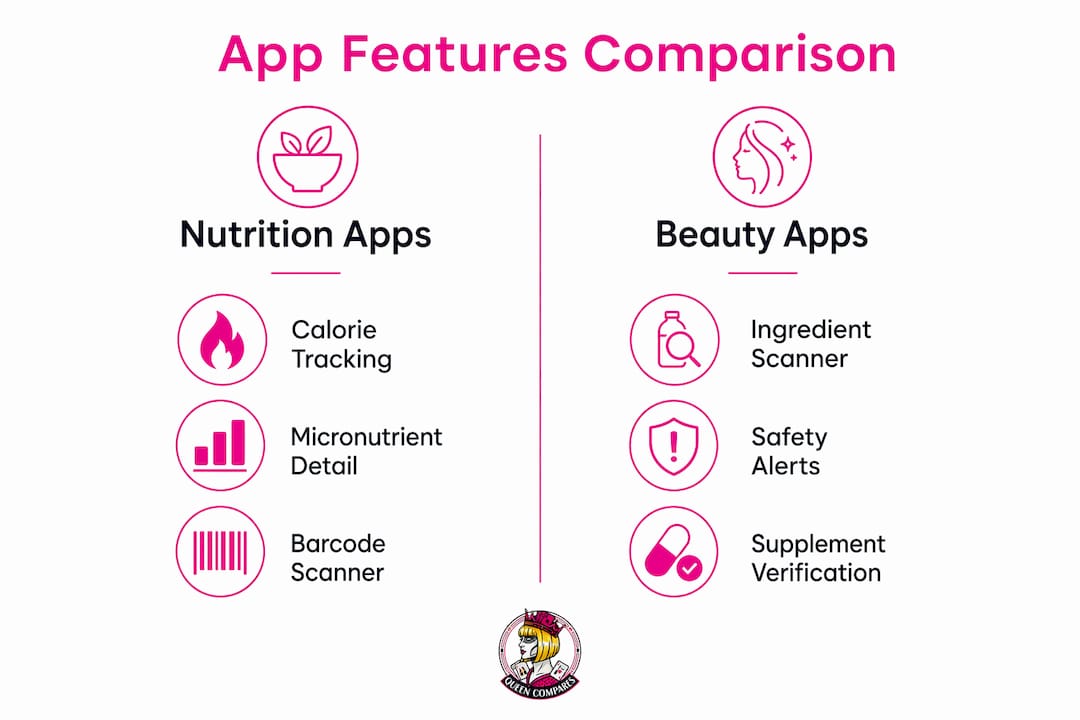
Cronometer is the clear pick for micronutrient depth. MyFitnessPal and Lose It! suit calorie-first goals. Yuka and Think Dirty pair well with any nutrition tracker when you need ingredient-safety checks on the products you buy.
What does each app actually do for beauty-focused users?
QueenCompares
QueenCompares sits in a different lane than a standard calorie counter. Its Ingredient Checker and Ingredient Library let you look up any cosmetic or supplement formula, flag allergens, and see evidence-level summaries for actives. That matters when you're logging a collagen supplement in Cronometer and want to know whether the formula contains anything controversial. The platform also surfaces skincare formula transparency details that nutrition apps simply don't touch.

Best for: Ingredient safety checks, allergen alerts, and supplement formula verification alongside a nutrition tracker.
Cronometer
Cronometer's edge is data honesty. It flags each entry with source tags like "NCCDB" or "USDA" so you know whether the vitamin data behind a logged food is lab-analyzed or estimated. Its web interface shows a data confidence score for your daily totals, which tells you what percentage of your logged foods have complete nutrient coverage. For beauty shoppers tracking biotin, zinc, or vitamin C intake, that transparency is genuinely useful. The app tracks up to around 92–95 nutrients and supports custom supplement entries, barcode scanning, and integrations with wearables and health platforms.
Key strengths for beauty users:
- Lab-analyzed NCCDB/USDA database entries
- Data confidence score visible on web
- Supplement and custom food entry
- Wearable and health platform integrations
Limitations: food-label scanning only (no cosmetic ingredient scanning); the interface has a steeper learning curve than consumer apps.
MyFitnessPal
MyFitnessPal claims one of the largest food databases available, with over 18 million global foods including restaurant items and user-saved recipes. It tracks calories, macros, and some micronutrients, and connects to more than 40 apps and devices including Apple Watch, Fitbit, and Garmin. The catch for beauty-focused users: many entries rely on crowdsourced data, so vitamin and mineral completeness varies. Barcode scanning is a Premium feature, not free.
Best for: Calorie and macro tracking with strong habit features and device integration.
Lose It!
Lose It! keeps things simple. Barcode scanning is available, logging is fast, and the app connects to Apple Health and Google Fit. It offers macro tracking and progress reports, but micronutrient depth is limited. Some entries are verified, but the database leans toward weight-loss use cases rather than detailed vitamin tracking. A solid choice if your primary goal is managing calories while you use a separate tool for ingredient safety.
Best for: Weight management and straightforward calorie logging.
MyNetDiary
MyNetDiary offers a clean interface for calorie and macro tracking with some meal planning features. Micronutrient coverage exists but varies by entry source, similar to MyFitnessPal. It's a reasonable alternative for users who find MyFitnessPal's interface overwhelming, though it doesn't add meaningfully more micronutrient accuracy for beauty-specific goals.
Yuka
Yuka is not a nutrition tracker in the traditional sense. It scans food and cosmetic product barcodes and returns a score-based safety rating based on ingredient analysis. For beauty shoppers, it's genuinely useful at the grocery store or beauty counter: scan a moisturizer or a packaged snack and get a quick read on concerning ingredients with daily habits that affect your skin's health from this wellness-focused article. It doesn't track your daily micronutrient intake, so it works best as a companion to Cronometer rather than a replacement.
Best for: Quick product safety checks while shopping.
Think Dirty
Think Dirty focuses exclusively on cosmetics. Scan a product barcode and it surfaces ingredient-by-ingredient safety ratings, flagging potentially harmful or controversial actives. The database skews toward personal care and beauty products, making it the most targeted option for clean beauty shoppers. Like Yuka, it doesn't track dietary micronutrients.
Best for: Fast cosmetic ingredient safety checks and finding cleaner product alternatives.
Pro Tip: When scanning a supplement barcode in Cronometer, look for apps that let you view the original nutrition label alongside the parsed database entry. That side-by-side check helps you catch discrepancies between what the label claims and what the app recorded.
QueenCompares makes ingredient safety part of your routine
Nutrition apps tell you what you're consuming. QueenCompares tells you whether what you're consuming is safe.
When you log a vitamin C serum or a collagen supplement in Cronometer, you're capturing intake data. But you're not seeing whether that supplement contains restricted actives, common allergens, or ingredients with conflicting evidence. That's exactly where QueenCompares steps in. The Ingredient Checker evaluates cosmetic and supplement formulas against an authoritative ingredient library, surfacing allergen alerts and evidence-level summaries so you can shop and supplement with confidence. Use the Ingredient Library to research specific actives like retinol, niacinamide, or biotin before you add them to your routine. Together, these tools give you the safety layer that no calorie counter provides. Head to QueenCompares and run your first ingredient check today.
FAQ
Which nutrition app is most accurate for vitamin and mineral tracking?
Cronometer is the most accurate option for micronutrient tracking because it uses lab-analyzed database entries tagged with NCCDB and USDA sources, and displays a data confidence score so you can see when nutrient data is incomplete.
Can nutrition apps scan cosmetic ingredients for safety?
Standard nutrition apps like MyFitnessPal, Lose It!, and Cronometer scan food labels only. For cosmetic ingredient safety, use Yuka, Think Dirty, or QueenCompares' Ingredient Checker, which are built specifically for that purpose.
Should I pay for a premium nutrition app subscription?
The Center for Science in the Public Interest recommends testing multiple apps before subscribing, since some apps gate barcode scanning and micronutrient reports behind paid tiers. Try the free version of each app first to confirm it fits your goals.
How do I track supplements for skin and beauty goals?
Log supplements as custom food entries in Cronometer to capture micronutrient intake, then cross-check the supplement formula in QueenCompares' Ingredient Checker to verify safety and flag any allergens or controversial actives.
What's the difference between Yuka and Think Dirty?
Yuka scores both food and cosmetic products, while Think Dirty focuses exclusively on cosmetics and personal care. Both are barcode-scanning companion tools, not full nutrition trackers, and work best alongside a dedicated dietary planning app like Cronometer.
Key Takeaways
For beauty-focused micronutrient tracking, Cronometer's lab-analyzed database and QueenCompares' Ingredient Checker together cover accuracy and safety in a way no single app achieves alone.
| Point | Details |
|---|---|
| Lab-analyzed data wins for micronutrients | Cronometer's NCCDB/USDA-tagged entries give more reliable vitamin and mineral data than crowdsourced databases. |
| Ingredient scanning needs a dedicated tool | Nutrition apps scan food labels only; use Yuka, Think Dirty, or QueenCompares for cosmetic and supplement safety. |
| Test before you subscribe | CSPI advises trying multiple apps free before paying, since barcode scanning and reports are often gated behind paid tiers. |
| Pair trackers for a complete workflow | Log intake in Cronometer, then verify supplement and cosmetic formulas in QueenCompares' Ingredient Library. |
| QueenCompares fills the safety gap | QueenCompares' Ingredient Checker and Ingredient Library add allergen alerts and evidence-level summaries that nutrition apps don't provide. |